The withdrawal button has been mandatory across the 27 EU member states since 19 June 2026 (Directive (EU) 2023/2673; in France, for example, Article L.221-21). Many merchants put their button in place in the final days, sometimes in a hurry. After the first few weeks, one finding keeps coming back: the button is often there, but not quite compliant. Here are the most frequent corrections, without dramatising, so you can check your own installation.
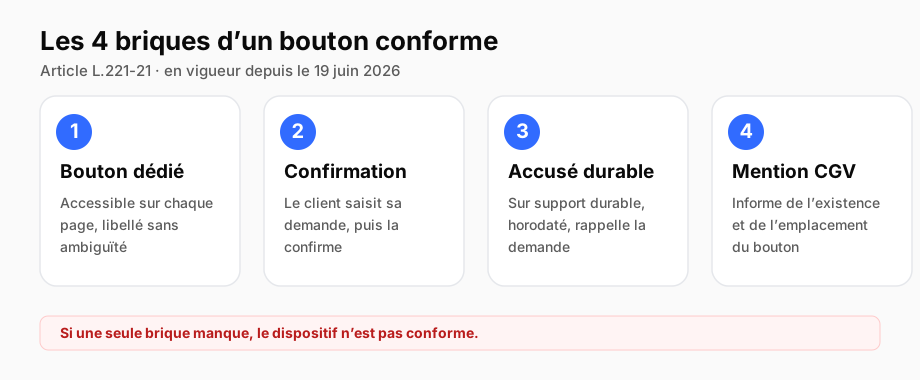
To put these corrections in context, here are the four building blocks a compliant button must bring together. The mistakes below almost always affect one of them.
1. The button's label is too vague
This is mistake number one. "Cancel", "Contact", "Customer service" do not make the button compliant. The rules require a clear and unambiguous wording, along the lines of "withdraw from contract here", and an explicit confirmation step ("Confirm the withdrawal"). A vague label is regarded as an obstacle.
2. The button is not on every page
The button must be accessible at all times throughout the period, from any page. On many sites, it appears only on a "Contact" page or in the footer of the home page. Yet the spirit of the text is that the consumer finds it without searching, wherever they are on the site.
The technical trap that hides the button
When the button "disappears" on certain pages, it is often an un-cleared cache (WordPress, PrestaShop), a Content-Security-Policy blocking the domain, or a site not republished after adding the tag. Three causes that account for almost all "it does not show up" cases.
3. No acknowledgement of receipt on a durable medium
Many mechanisms display a confirmation on screen and stop there. That is not enough: the law requires an acknowledgement of receipt on a durable medium, that is, a written record the consumer keeps (a summary email). A message that disappears on reload proves nothing.
4. No timestamped proof kept
This is the most dangerous blind spot. The button works, the customer may receive an email, but nothing is archived in an enforceable way. In the event of a dispute or a CCPC inspection months later, the merchant cannot demonstrate that a request was indeed received on a given date. Compliance is not the button, it is the record behind it.
5. The T&Cs mention has been forgotten
The last block, the one most often forgotten: the T&Cs must inform, before purchase, of the existence and location of the button. A perfect mechanism without that mention remains incomplete.
Seven concrete points to check that your button is genuinely compliant, and not merely present on screen.
How to get back on track
None of these corrections is heavy. The logic is always the same: the right label, accessible everywhere, an acknowledgement on a durable medium, timestamped proof archived, a T&Cs mention. If one is missing, the mechanism is not compliant, but putting it right is quick.
This is precisely what BackToMe covers in one block: the button with the right label, the acknowledgement of receipt, the timestamped archiving with evidential value. You start with a free 7-day trial (EUR 0 today, cancellable in one click), and the button reaches full legal value. To check or take over an existing installation, see the installation guide.

Founder of BackToMe
Art. L.221-21 · 19 June 2026
Ready to install the withdrawal feature?
Install the withdrawal button on your site in five minutes. 7-day free trial: 0 € today, 30-day money-back guarantee.
Start the free trial →